This is the second article in my series about running Vates XCP-NG with Pure Storage. If you haven’t already, check out the first article: Who is Vates and why should you look at them?
Introduction
Before diving into storage integration and architecture design in the upcoming articles of this series, let’s take a step back and cover the fundamentals. If you’re new to the Vates ecosystem, this article will give you a solid understanding of what XCP-NG and Xen Orchestra are, how they work, and what makes this platform a compelling choice for enterprise virtualization.
If you’re already familiar with XCP-NG, feel free to skip ahead to the next article where we’ll get hands-on with Pure Storage FlashArray integration.
XCP-NG: The hypervisor
XCP-NG is an open-source virtualization platform based on the Xen hypervisor, one of the most mature and proven hypervisors in the industry. Xen has been around since 2003 and has powered some of the largest cloud infrastructures in the world, including the early days of Amazon Web Services.
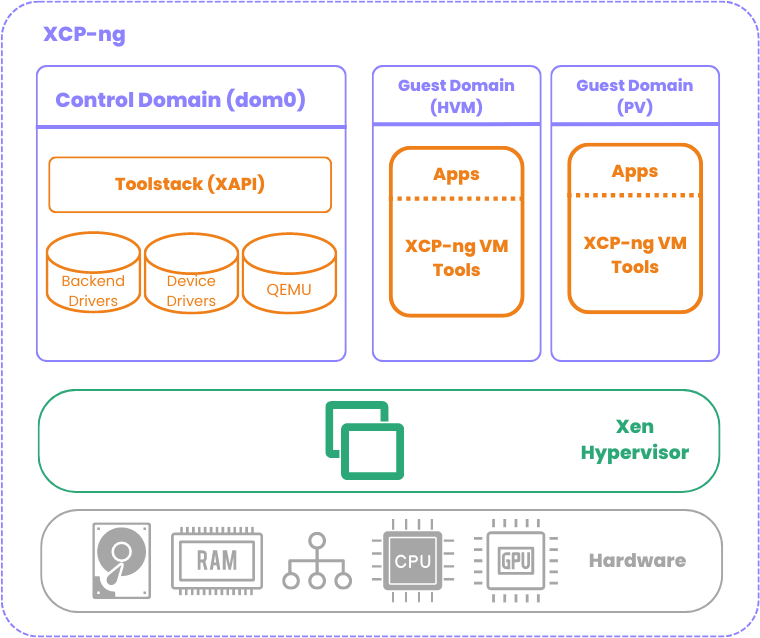
XCP-NG packages the Xen hypervisor with all the tools and components needed to run a production virtualization environment. It is a Type 1 (bare-metal) hypervisor, meaning it runs directly on the physical hardware without requiring an underlying operating system. When you install XCP-NG on a server, it boots into a lightweight Linux-based control domain — called Dom0 — which manages the hardware resources and provides the management interface. Virtual machines run in isolated domains called DomU, with direct access to hardware resources through Xen’s paravirtualization and hardware-assisted virtualization capabilities.
Key features
Compute management — XCP-NG supports live migration (XMotion), allowing virtual machines to move between hosts with zero downtime. VMs can be configured with CPU and memory hot-add capabilities, and the platform supports both paravirtualized (PV) and hardware-assisted (HVM) virtualization modes.
High Availability — When enabled, XCP-NG monitors host health across the pool. If a host fails, the platform automatically restarts the affected virtual machines on surviving hosts. This requires shared storage — which is exactly where FlashArray comes in.
Pooling — Multiple XCP-NG hosts can be grouped into a resource pool, which acts as a single manageable entity. All hosts in a pool share access to common storage repositories, enabling VM mobility and workload balancing across the cluster. One host acts as the pool master, handling management operations for the entire pool.
Networking — XCP-NG uses Open vSwitch (OVS) or a standard Linux bridge for virtual networking. It supports VLANs, network bonding (LACP or active-passive), and SR-IOV for high-performance network passthrough. For iSCSI storage connectivity, dedicated network interfaces or VLANs are strongly recommended to isolate storage traffic from management and VM traffic.
Storage — XCP-NG connects to storage through Storage Repositories (SRs). The platform supports multiple storage backends including local disk, NFS, iSCSI, Fibre Channel, and GFS2 for shared block storage with concurrent access. This flexibility makes it straightforward to integrate with enterprise storage arrays like Pure Storage FlashArray.
Xen Orchestra: The management layer
While XCP-NG provides the hypervisor, Xen Orchestra (XO) is the web-based management platform built by Vates to manage the entire virtualization infrastructure from a single interface. Think of it as the equivalent of VMware vCenter — but accessible entirely through a web browser with no additional Windows or Linux server required to run it.
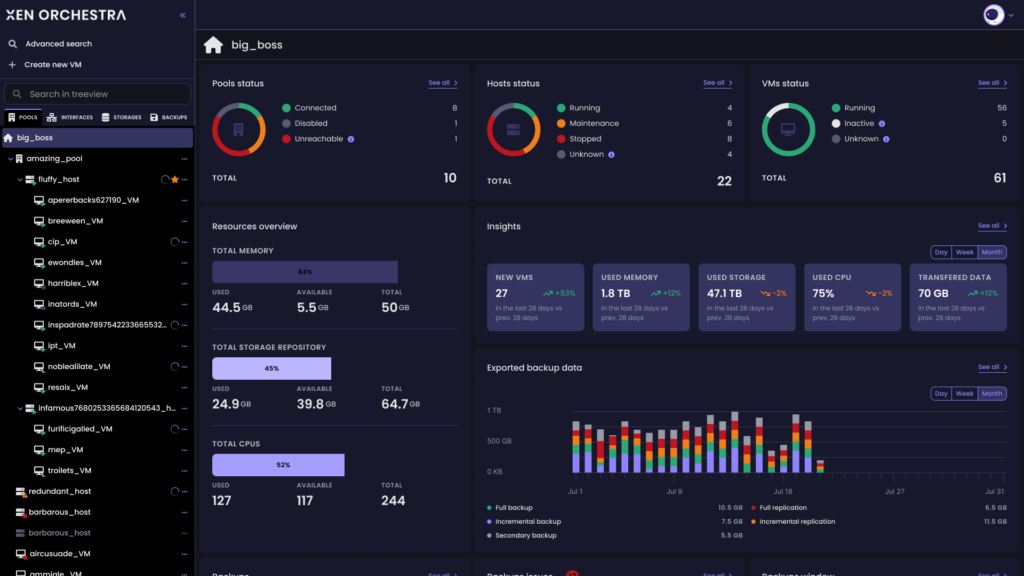
Xen Orchestra connects to one or more XCP-NG pools and provides centralized management for all operations.
Core capabilities
VM lifecycle management — Create, clone, snapshot, migrate, and delete VMs from the web UI. XO supports VM templates, cloud-init integration for automated guest configuration, and bulk operations for managing large environments efficiently.
Backup and replication — This is where Xen Orchestra really shines. XO includes a full-featured backup engine — no additional product or license required. It supports multiple backup modes:
- Full backup — Complete VM export
- Delta backup — Incremental backups using changed block tracking, significantly reducing backup time and storage consumption
- Disaster Recovery (DR) — Continuous replication of VMs to a secondary site with configurable RPO
- Mirror backup — Maintains a synchronized copy of VMs on a target storage
Backups can target local storage, NFS shares, SMB shares, or S3-compatible object storage — which opens an interesting integration path with Pure Storage FlashBlade and its native S3 support.
Monitoring and visualization — XO provides real-time and historical performance dashboards for hosts, VMs, network, and storage. It allows administrators to quickly identify bottlenecks and capacity trends without needing an external monitoring stack.
Self-service portal — For larger organizations, XO offers a self-service feature where administrators can delegate VM creation and management to specific users or groups, with resource quotas and permissions — useful in multi-team or lab environments.
REST API and automation — XO exposes a comprehensive REST API, enabling full automation through scripts, Terraform, Ansible, or any tool that can make HTTP calls. For infrastructure-as-code workflows, this is a key capability.
Deployment model
Xen Orchestra is typically deployed as a virtual appliance (XOA) running directly on the XCP-NG pool it manages. Vates provides a pre-built appliance that can be deployed in minutes. The appliance receives automatic updates and is the recommended deployment method for production environments.
For those who prefer to build from source, XO is also available as an open-source project that can be compiled manually — though this approach does not include access to Vates commercial support or automatic updates.
Licensing model
Xen Orchestra follows a subscription-based model with different tiers:
- XO Lite — A lightweight, free management interface included directly in XCP-NG (limited features, suitable for small environments or quick access)
- XO Starter / Standard / Premium / Enterprise — Paid subscriptions that unlock progressively more features: backup, DR, load balancing, SDN controller, technical support, and more
For production environments, the Premium or Enterprise tier is generally recommended as it includes the full backup engine, high availability features, and priority support from Vates.
What’s next
Now that we’ve covered the building blocks of the Vates ecosystem, it’s time to get into the real stuff. In the next article, we’ll design a complete architecture for running XCP-NG with Pure Storage FlashArray over iSCSI, including network topology, storage repository configuration, and a deep dive into ActiveCluster for metro-stretch high availability.
If you’re planning to run XCP-NG with enterprise shared storage, that’s where things get really interesting — stay tuned!
This article is part of a series on Vates XCP-NG and Pure Storage integration. You can find all articles here: XCP-NG / Vates Articles